martes, 4 de julio de 2023
viernes, 24 de marzo de 2023
ORACLE GOLDENGATE
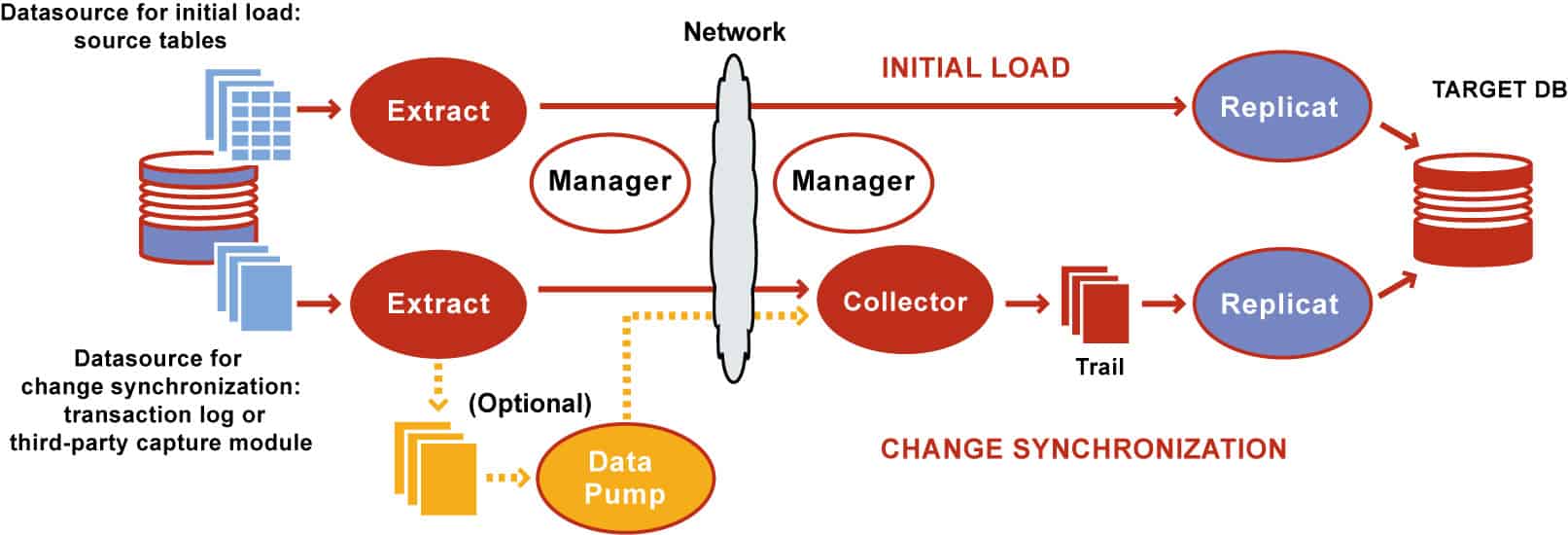
This post covers Overview & Components of Oracle GoldenGate (software for real-time data integration and replication in heterogeneous IT Systems).
Oracle Goldengate is a must-know for DBAs & consists of following components:
- Manager
- Extract
- Data Pump
- Collector
- Replicat
- Trails Files

1. Extract
Oracle GoldenGate extract process resides on the source system and captures the committed transactions from the source database. The DB logs may contain committed as well as uncommitted data but, remember, extract process captures only committed transactions and write them to local trail files. It is important to note that Extract captures only the committed transaction from its data source.
The extract can be configured for any of the following purposes:
- Initial Load: For the Initial Load method of replication, extract captures a static set of data directly from the source table or objects.
- Change Synchronization: In this method of replication, extract process continuously captures data (DML and DDL) from the source database to keep the source and target database in a consistent state of replication and it is the sole method to implement continuous replication between the source and target database.
The data source of the extract process could be one of the following
- Source table (if the extract is configured for initial load)
- The database transaction logs or recovery logs such as (Oracle Redo Logs, Oracle Archive Logs, or SQL audit trails or Sybase transaction logs) depending on the type of source database.
- Third-party capture module can also be used to extract transactional data from the source database. In this method, the data and metadata from an external API are passed to the extract API.
Extract captures changes from the source database based on the extract configuration (contains the objects to be replicated from the source database).
Multiple extract processes can be configured on a source database to operate on same/different source objects.
The extract performs either of the following tasks after extracting the data/records from the source database objects.
- Delivers the data extracted from the source to the target server Trail Files through the collector process
- Writes the data extracted from the source on to the Local Trail Files on the source system
Optionally, Extract can also be configured to perform data filtering, transformation and mapping while capturing data and or before transferring the data to the target system.
2. DataPump
This is an optional GoldenGate process (server process) on the source system and comes into picture when the extracted data from the source is not directly transferred to the target Trail Files. In the DataPump setup, the extract process gets the records/data from a source and keeps it in the local file system by means of local Trail Files. The DataPump acts as a secondary extract process where it reads the records from Local Trail Files and delivers to the Target system Trail files through the collector.
Data Pump is also known as secondary extract process. It is always recommended to include data Pump in Goldengate configuration.
3. Collector
The collector is a server process that runs in the background on the target system in a GoldenGate replication setup where the extract is configured for continuous Change Synchronization.
Collector has the following roles to perform in the GoldenGate replication.
- When a connection request is sent from the source extract, the collector process on the target system scan and map the requesting connection to the available port and send the port details back to the manager for assignment to the requesting extract process.
- Collector receives the data sent by source extract process and writes them to Trail Files on the target system.
There is one collector process on the target system per one extract process on the source system, i.e it is a one to one mapping between extract and collector process.
4. Replicat
The Replicat process runs on the target system and is primarily responsible for replicating the extracted data delivered to the target trail files by the source extract process.
The replicat process scans the Trail Files on the target system, generates the DDL and DML from the Trail Files and finally applies them on to the target system.
Replicat has the following two types of configuration which relate to the type of extract being configured on the source system.
- Initial loads: In initial data loads configuration, Replicat can apply a static data copy which is extracted by the Initial load extract to target objects or route it to a high-speed bulk-load utility.
- Change synchronization: In change synchronization configuration, Replicat applies the continuous stream of data extracted from the source objects to the target objects using a native database interface or ODBC drivers, depending on the type of the target database.
Optionally, Replicat can also be configured to perform data filtering, transformation, and mapping before applying the transaction on to the target database
5. Trail or Extract Files
Trails or Extract Files are the Operating system files which GoldenGate use to keep records extracted from the source objects by the extract process. Trail files can be created on the source system and target system depending on the GoldenGate replication setup. Trail Files on the source system are called Extract Trails or Local Trails and on the target system called as Remote Trails.
Trail files are the reason why Goldengate is platform-independent.
By using trail GoldenGate minimizes the load on the source database as once the transaction logs/online logs/redo logs/ archive logs are extracted and loaded by the extract process to trail files, all the operations like filtering, conversions, mapping happens out of the source database. Use of trail file also makes the extraction and replication process independent of each other.
6. Manager
Manager can be considered as the parent process in a GoldenGate replication setup on both the source and target system. Manager, controls, manages and maintains the functioning of other GoldenGate processes and files. A manager process is responsible for the following tasks.
- Starting up Oracle GoldenGate processes
- Maintaining port number for processes
- Starting up dynamic processes
- Performing GoldenGate Trail Management
- Creating events, errors and threshold report.
martes, 26 de julio de 2022
CONFIGURAR Y MONITOREAR FLASHBACK DATABASE CON RESTORE POINT
Se adjunta algunos comandos para crear y monitorear la creacion de un Punto de Restauración.
## tiempo en minutos 1440 = 1 dia
ALTER SYSTEM SET DB_FLASHBACK_RETENTION_TARGET=1440;
SQL> select open_mode from v$database;
OPEN_MODE
--------------------
READ WRITE
SQL> SELECT NAME,CDB,LOG_MODE,FLASHBACK_ON FROM V$DATABASE;
NAME CDB LOG_MODE FLASHBACK_ON
--------- --- ------------ ------------------
CDB1 YES ARCHIVELOG YES
## RP Normal
SQL> CREATE RESTORE POINT BEFORE_RP;
## RP Gatantizado, independiente del tiempo programado
SQL> CREATE RESTORE POINT BEFORE_RP GUARANTEE Flashback DATABASE;
## Borrado de RP
SQL> DROP RESTORE POINT BEFORE_RP;
## consulta scn
SQL> select current_scn,current_timestamp from v$database;
*****************
## consulta Restore Point
set pagesize 200 linesize 200
col NAME format a30
col TIME format a40
SELECT NAME, SCN, TIME, DATABASE_INCARNATION#,GUARANTEE_FLASHBACK_DATABASE,STORAGE_SIZE/1024/1024 "Size GB" FROM V$RESTORE_POINT;
## Query resumen para consultar utilizacion de Restore Point
set pagesize 200 linesize 200
col NAME format a30
SELECT max(NAME) NAME
, max(LIMIT) LIMIT
, max(USED) USED
, max(Reclaimable) Reclaimable
, max(Used_Percent) Used_Percent
, max(Free_Percent) Free_Percent
, max(NVL(restore_point,0)) Restore_Point
, round(100.0*max(NVL(restore_point,0))/max(LIMIT),1) Restore_Point_Percent
FROM
(select name
, round(SPACE_LIMIT/1024/1024) LIMIT
, round(SPACE_USED/1024/1024) USED
, round(SPACE_RECLAIMABLE/1024/1024) Reclaimable
, round(100.0*space_used/space_limit,1) Used_Percent
, round(CASE WHEN space_limit > 0 AND space_limit >= space_used AND space_used >= space_reclaimable THEN 100.00 * (space_limit - (space_used - space_reclaimable))/space_limit ELSE NULL END,1) Free_Percent,
to_number(null) restore_point
FROM V$RECOVERY_FILE_DEST
UNION ALL
SELECT '' name
, to_number(null) limit
, to_number(null) USED
, to_number(null) Reclaimable
, to_number(null) Used_Percent
, to_number(null) Free_Percent
, round(sum(STORAGE_SIZE)/1024/1024) restore_point
FROM V$RESTORE_POINT)
/
lunes, 18 de julio de 2022
Oracle ASM devices pointing to multipath devices and not scsi paths
How to make sure Oracle ASM devices pointing to multipath devices and not scsi paths, sd devices when using ASMLib to manage ASM disks?
Red Hat Insights can detect this issue
Medio Ambiente
- Red Hat Enterprise Linux (RHEL) 5, 6, 7, 8
- device-mapper-multipath
- Oracle ASM using ASMLib
Cuestión
- Oracle application crashes when a single path in multipath fails. The application should be unaware of underlying path failures.
- ASM crashed and with that the Oracle DB
- Using Device Mapper Multipathing for Oracle database, and expect Oracle LUNs to see multipath, not sd devices?
- How to make sure Oracle ASM devices pointing to multipath devices and not scsi paths, sd devices when using
ASMLibto manageASMdisks? - I/O's to the SAN are not shared across all the paths of multipath in Oracle application server configured with Oracleasm.
Resolución
ORACLEASM_SCANORDER should be configured to force the use of the multipath pseudo-device. Since ASM uses entries from /proc/partition, a filter would need to be set to exclude underlying paths.
Edit
/etc/sysconfig/oracleasmand adddmto the SCANORDER, andsdto SCANEXCLUDE as follows:# ORACLEASM_SCANORDER: Matching patterns to order disk scanning ORACLEASM_SCANORDER="dm" # ORACLEASM_SCANEXCLUDE: Matching patterns to exclude disks from scan ORACLEASM_SCANEXCLUDE="sd"This would require that the
oracleasmconfiguration to be updated:# oracleasm configure # oracleasm scandisksFile
/etc/sysconfig/oracleasmis soft-linked to/etc/sysconfig/oracleasm-_dev_oracleasmwhich is the file used by OracleASM. Verify the soft-link exists.# ls -al /etc/sysconfig/oracleasm lrwxrwxrwx 1 root root 39 Feb 22 15:54 /etc/sysconfig/oracleasm -> /etc/ sysconfig/oracleasm-_dev_oracleasmChanges to the
oracleasmconfiguration file requires a restart of OracleASM service to take effect. This can be disruptive in a production environment.Note: It is recommended to schedule a reboot after setting
SCANORDERandSCANEXCLUDEin/etc/sysconfig/oracleasm. Normally a system reboot is not required fororacleasmto start using the multipath devices. However, in (private) RHBZ#1683606, it has been noticed that, whileoracleasmwas still allowed to detect single paths (before the configuration change and the restart oforacleasm) it could change the value of counters used in device structures within the kernel (block_device.bd_holders) to invalid (negative) values and make the paths appear as being in use. If this happens, restarting onlyoracleasmwill not clear the counters and the devices will continue appearing as being in use. In this case, multipath will still be unable to add the paths to the corresponding maps until the system is rebooted. If this happens, messages similar to the following will be appearing in the system logs whenever multipath tries to add one of those paths to the corresponding map:device-mapper: table: 253:<dm_num>: multipath: error getting device device-mapper: ioctl: error adding target to tableThe problem can appear even when multipath is using the paths (i.e. the counters can be "silently" changed while the paths are in use by multipath). In such a scenario, the problem will appear in case of an outage, which will cause the paths to be removed from the maps. When the paths return, multipath will be failing to add them to the corresponding maps.
For this reason, it is recommended to schedule a reboot after setting
SCANORDERandSCANEXCLUDEin/etc/sysconfig/oracleasm.Once restarted, verify the multipath device is being used, a major of 253 should be returned:
# oracleasm querydisk -d <ASM_DISK_NAME>
- Refer to Oracle documentation (Doc ID 868352.1: ASMLib Configuration File "/etc/sysconfig/oracleasm" Not Effective) for further information.
Causa Raíz
When devices were added to the DISKGROUP, the underlying sd* device was used instead of the multipath pseudo device.
The dm-* devices are intended for internal use and are not persistent. However, once the DISKGROUP is created this writes metadata to the device which ASM is then able to check the header regardless of the dm- assignment. The intention here is to force ASM to read from multipath devices.
Procedimientos para el Diagnóstico
Query the disk to obtain the
major:minornumber of the disk being used by the disk group:# /etc/init.d/oracleasm querydisk -d ASM_DATA1 Disk "ASM_Data1" is a valid ASM disk on device [8,16]We can see that
8:16is the underlyingsdbpath, not theASM_DATA1multipath pseudo device. Failover would not occur with this configuration.ASM_DATA1 (3600500000000000001) dm-24 IBM,2107900 [size=100G][features=1 queue_if_no_path][hwhandler=0][rw] \_ round-robin 0 [prio=0][active] \_ 3:0:1:1 sdb 8:16 [failed][faulty] \_ 5:0:0:1 sdc 8:32 [active][ready] \_ 5:0:1:1 sdd 8:48 [active][ready] \_ 3:0:0:1 sde 8:64 [failed][faulty]This can also be see in
/proc/partitions:8 0 142577664 sda 8 1 514048 sda1 8 2 24579450 sda2 8 3 12289725 sda3 8 16 52428800 sdb 8 32 52428800 sdc 8 48 52428800 sdd 8 64 52428800 sdeThe
major:minorof the multipathASM_DATA1pseudo device would be253:24, ordm-24. This is the device that should be used:253 24 52428800 dm-24Note: To check if an
oracleasmdevice is mapped correctly in a vmcore, please see How to map an oracleasm path in a vmcore.
miércoles, 19 de enero de 2022
Administer Oracle Grid Infrastructure Start, Stop, Other
Un resumen de los comandos más relevantes para Levantar/Parar/Chequear los recursos del Cluster
1 2 3 4 5 6 7 8 9 10 11 12 13 14 15 16 17 18 19 20 21 22 23 24 25 26 27 28 29 30 31 32 33 34 35 36 37 38 39 40 41 42 43 44 45 46 47 48 49 50 51 52 53 54 55 56 57 58 59 60 61 62 63 64 65 66 | # Status, Configuración y Chequeos de Recursos de Clustercrsctl check crs # Status Servicios CRScrsctl check cluster -n rac2 # Status Servicios Clustercrsctl check ctss # Status Servicio CTSScrsctl config crs (requiere root) # Configuración Autoarranque OHAScat /etc/oracle/scls_scr/rac1/root/ohasdstr # Configuración Autoarranque OHAScrsctl stat res -t # Status Todos Recursos Clustercrsctl stat res ora.rac.db -p # Configuración de un Recursocrsctl stat res ora.rac.db -f # Configuracion Completacrsctl query css votedisk # Status Voting Disksolsnodes -n -i -s -t # Listar Nodos Clusteroifcfg getif # Información Interfaces de Redocrcheck # Status OCR (ejecutar como root para chequear corrupción lógica)ocrcheck -local (requiere root) # Status OCR con CRS/OHAS OFFLINEocrconfig -showbackup # Información Backups OCRocrconfig -add +TEST # Crear una copia de OCR en otro Diskgroupcluvfy comp crs -n rac1 # Verificar Integridad CRSsrvctl status database -d RAC # Status Base de Datossrvctl status instance -d RAC -i RAC1 # Status Instanciasrvctl status service -d RAC # Status Servicios de una BDsrvctl status nodeapps # Status Servicios de Redsrvctl status vip -n rac1 # Status IP Virtualsrvctl status listener -l LISTENER # Status Listenersrvctl status asm -n rac1 # Status Instancia ASMsrvctl status scan # Status IP SCANsrvctl status scan_listener # Status Listener SCANsrvctl status server -n rac1 # Status Nodosrvctl status diskgroup -g DGRAC # Status Disk Groupsrvctl config database -d RAC # Configuración Databasesrvctl config service -d RAC # Configuración Serviciossrvctl config nodeapps # Configuración Servicios Redsrvctl config vip -n rac1 # Configuración IP Virtualsrvctl config asm -a # Configuración Instancia ASMsrvctl config listener -l LISTENER # Configuración Listenersrvctl config scan # Configuración IP SCANsrvctl config scan_listener # Configuración SCAN Listener# Arrancar, Parar y Reubicar Recursos de Clustercrsctl stop cluster # Parar Clusterware (requiere root)crsctl start cluster # Arrancar Clusterware (requiere root)crsctl stop crs # Parar OHAS (requiere root) - Incluye Parada Clusterwarecrsctl start crs # Arrancar OHAS (requiere root) - Incluye Arranque Clusterwarecrsctl disable # Deshabilitar Autoarranque CRS (requiere root)crsctl disable # Habilitar Autoarranque CRS (requiere root)srvctl stop database -d RAC -o immediate # Parar Database (parada IMMEDIATE)srvctl start database -d RAC # Arrancar Databasesrvctl stop instance -d RAC -i RAC1 -o immediate # Parar Instancia BD (parada IMMEDIATE)srvctl start instance -d RAC -i RAC1 # Arrancar Instancia BDsrvctl stop service -d RAC -s OLTP -n rac1 # Parar Serviciosrvctl sart service -d RAC -s OLTP # Arrancar Serviciosrvctl stop nodeapps -n rac1 # Parar Servicios Red (requiere parar dependencias)srvctl start nodeapps # Arrancar Servicios Redsrvctl stop vip -n rac1 # Parar IP Virtual (requiere parar dependencias)srvctl start vip -n rac1 # Arrancar IP Virtualsrvctl stop asm -n rac1 -o abort -f # Parar Instancia ASM (es recomendable usar "crsctl stop cluster")srvctl start asm -n rac1 # Arrancar Instancia ASM (es recomendable usar "crsctl start cluser")srvctl stop listener -l LISTENER # Parar Listenersrvctl start listener -l LISTENER # Arrancar Listenersrvctl stop scan -i 1 # Parar IP SCAN (requiere parar dependencias)srvctl start scan -i 1 # Arrancar IP SCANsrvctl stop scan_listener -i 1 # Parar SCAN Listenersrvctl start scan_listener -i 1 # Arrancar SCAN Listenersrvctl stop diskgroup -g TEST -n rac1,rac2 # Parar Disk Group (requiere parar dependencias)srvctl start diskgroup -g TEST -n rac1,rac2 # Arrancar Disk Group (requiere parar dependencias)srvctl relocate service -d RAC -s OLTP -i RAC1 -t RAC2 # Reubicar Servicio (del nodo 1 al nodo 2)srvctl relocate scan_listener -i 1 rac1 # Reubicar SCAN Listener |